Menus
Menus from Minute Marketing are crafted to enhance your customer experience while showcasing your food and drink offerings in style.
- Sizes:
- 4" x 10" (folds to 4" x 2.5")
- 4" x 9"
- 4.25" x 11"
- 8.5" x 5.5"
- 8.5" x 11"
- 8.5" x 14"
- 11" x 17"
- Print Options:
- Full Color Both Sides
- Full Color Front, No Back
- Paper Stocks:
- 100 lb. Gloss Book
- 100 lb. Uncoated Cover
- 130 lb. Silk Cover
- 130 lb. Uncoated Cover
- 14 mil Synthetic
- 14 pt. Coated One Side
- 14 pt. Coated Both Sides
- 16 pt. Coated Both Sides
- Folding:
- Double Parallel Fold
- Flat
- Folded
- Finishing Options:
- Standard (coating depends on quantity)
- Laminated
- Gloss
- Matte
- Soft Touch
- Proofs:
- A digital proof for every order. Nothing prints until you approve it.
- Delivery:
- Local pickup or shipping. Rates and any sales tax are shown before you pay.
- More Info:
- Include a small takeaway menu with an order or leave copies at your checkout so customers can keep your selection and ordering details at home.
- Mail menus to repeat customers or distribute copies to nearby businesses and neighbors. Add your address, hours and phone number so readers know how to order.
- Show a few popular dishes with clear photos, descriptions and prices. If you add a coupon, include its terms and expiration date.
- On 100 lb. Gloss Book mini menus, runs of 250 or more receive aqueous coating. Runs of 100 or fewer are printed digitally without added coating. Other stocks retain their separate finishing choices.
- Use a compact menu for a short selection or a larger sheet for a full menu. Restaurants, coffee shops, salons and spas can use the same format for food, drinks or services.
- Upload artwork for each printed side and review the digital proof for spelling, prices, image placement and panel order before approving it for print. You may also request a manually checked PDF proof for an additional fee; our team checks file specifications and contacts you about any issues. Processing includes one uploaded file set and one proof.
- Fast turnaround helps you get new menus into circulation. Production starts after payment and artwork approval; shipping time is additional. Ask our team about the current schedule and expedited delivery options.
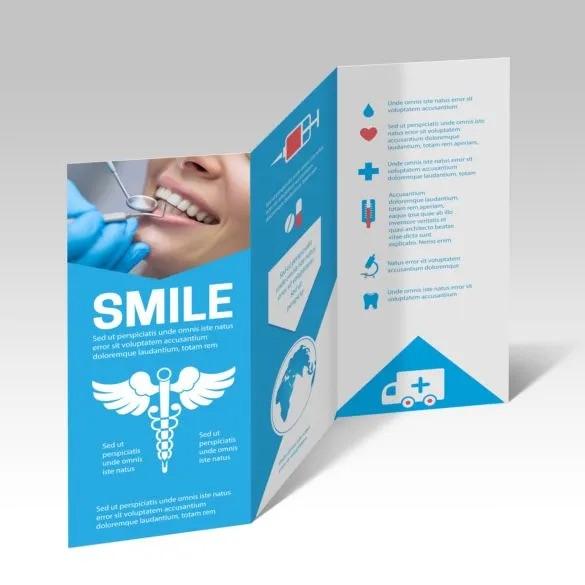
- Double Parallel Fold:
- Fold the 4" x 10" sheet in half, then in half again in the same direction. The finished menu is 4" x 2.5", with four panels on each side and eight printed panels in total.
- Flat:
- An unfolded sheet keeps each printed side in view. Use it for counter menus, drinks or dessert lists.
- Folded:
- Separate your menu into panels for a cover and interior sections. Confirm the fold pattern and finished panel dimensions with our team before laying out your artwork.
Choose Double Parallel Fold for the compact 4 x 10 format. Flat and Folded remain available for our other sheet sizes; confirm their panel dimensions before designing.
Make a folded paper mockup to check the reading order. Keep item names, prices and contact details away from creases, and confirm your stock and finish choices with our team.
- Bleed:
- Extend backgrounds and images 0.125" beyond every trim edge. Add 0.25" to each sheet dimension for the full file size.
- Safe Zone:
- Keep text, prices and logos at least 0.125" inside the trim edges and away from fold lines.
- Resolution:
- Use 350 dpi images at the final printed size for compact mini menus.
- Color Mode:
- Prepare artwork in CMYK. Printed colors can differ from a screen preview.
- File Formats:
- Print-ready PDF preferred; PNG, JPG and TIFF are also accepted. Flatten image layers and embed or outline PDF fonts.
- File Size:
- Check the current per-file upload limit in the upload window. Contact our team if your artwork exceeds it.
- Printed Sides:
- Supply one page per printed side. For two-sided folded menus, prepare an outside spread and an inside spread at the full sheet size, with matching orientation.
- Folding:
- Confirm the fold pattern and panel widths before laying out folded menus. Make a paper mockup to check the cover, panel sequence and inside orientation. Keep fold guides out of the exported artwork.
- Proof:
- Review the digital proof for trim, readable prices, spelling, images and front/back orientation. Confirm folded panel placement with our team before approving artwork for printing.
- Manual PDF Proof:
- Request a manually processed PDF proof for an additional fee. We check the file specifications, contact you if corrections are needed, and send a proof for approval. Ask our team for the current proof schedule; weekends and holidays can affect processing.
- Included Processing:
- Processing covers one uploaded file set and one proof. Review an instant proof carefully: choosing it does not include another proof. Contact our team about physical-media submission before sending files; review starts after files arrive.
Incorrect dimensions, missing bleed or unclear panel order may require artwork changes before approval. Check your order status in your account and contact our team with file questions.
Choose your size and download a template. Bleed and safe areas are included.
| Size | Vertical Templates | Horizontal Templates | Square Templates |
|---|---|---|---|
| 4" x 10" Menus | |||
| 4" x 10" |
Frequently Asked Questions
What sizes are available for Menus?
Size: 4.25" x 11" (quote), 4" x 9" (quote), 4" x 10", 8.5" x 5.5" (quote), 8.5" x 11" (quote), 8.5" x 14" (quote), 11" x 17" (quote). Some options depend on the other choices in your order; the order form shows compatible combinations.
What papers or materials can I choose for Menus?
Paper: 100 lb. Gloss Book, 100 lb. Uncoated Cover (quote), 130 lb. Silk Cover (quote), 130 lb. Uncoated Cover (quote), 14 mil Synthetic (quote), 14 pt. Coated One Side (quote), 14 pt. Coated Both Sides (quote), 16 pt. Coated Both Sides (quote). Choose from the materials shown for your selected configuration. Ask our team if you need help comparing them.
Which finishes are offered for Menus?
Finish: Standard (coating depends on quantity), Laminated, Gloss, Matte, Soft Touch. Some options depend on the other choices in your order; the order form shows compatible combinations.
How should I prepare artwork for Menus?
Set up your Menus artwork at the selected finished size. Use the original production template for the matching product, size and layout. Follow the bleed, safe area, fold, color and resolution instructions inside that file, then supply a print-ready PDF with embedded fonts.
Will I see a proof of my Menus before printing?
Yes. Review the digital proof for your Menus order and check spelling, layout, size and placement. Request corrections if needed. Printing starts after you approve the proof.
How do I order or reorder Menus?
Open the Menus order page, choose your options and quantity, and add your artwork or request design help. Review the price for your choices before checkout. To reorder, use the reorder option in your account or share your previous order number with our team; confirm the current specifications and price before approving.
Can I have Menus shipped or pick it up locally?
Local pickup or shipping is available for Menus. Choose from the delivery options offered at checkout, where shipping charges are shown for your destination. Contact our team if your project needs special delivery arrangements.
How is bulk pricing handled for Menus?
Listed quantities for Menus include 25, 50, 100, 250, 500, 1,000, 2,500, 5,000, 10,000, 15,000, 20,000, 25,000, 30,000, 35,000, 40,000, 45,000, 50,000, 55,000, 60,000, 65,000, 70,000, 75,000, 80,000, 85,000, 90,000, 95,000, 100,000. Choose a quantity to see the price for your configuration; available quantities can depend on your other options. For larger runs or quantities not shown, request a quote.
Honest Pricing Guarantee
We keep our pricing clear so you can compare options and plan your print budget. Your selection shows its subtotal before shipping; review any design, proof or delivery charges before placing your order.